GIT
key ideas
gitis just VCS(Version Control System). How to use it depends on the user.- It is generally good idea to make new branch If
- You may want to discard the working branch.
- Current work is out dated to released version.
- It requires test or approval before released.
- You need to switch to other work while at it.
git rebasevs.git merge(pg.89)- You can use
--patchto partially commit or fix part of the files. - 공유된 히스토리는 절대 변경하지 않는 것이 좋다.
git commands
| 명령어 | 용도 |
|---|---|
git clone URL |
원격 저장소 사본을 내려받는다 |
git init |
현재 폴더를 새로운 Git 저장소로 변환한다 |
git status |
현재 저장소의 상태 보고를 확인한다. |
git add -all |
모든 수정사항과 새로운 파일을 저장소 준비 영역에 추가한다 |
git commit -m “message” |
모든 준비 영역의 파일을 저장소에 커밋한다 |
git log |
저장소 히스토리를 검토한다 |
git log --oneline |
프로젝트의 히스토리 요약을 본다 |
git branch --list |
모든 로컬 브랜치 목록을 본다 |
git branch --all |
모든 로컬 및 원격 브랜치 목록을 본다 |
git branch --remotes |
모든 원격 브랜치 목록을 본다 |
git checkout --track remote_name/branch |
원격 브랜치의 로컬 사본을 생성한다 |
git checkout branch |
현재 working 브랜치를 다른 로컬 브랜치로 바꾼다. |
git checkout -b branch branch_parent |
특정 브랜치로부터 새 브랜치를 생성한다 |
git add filename(s) |
특정 파일만 준비 영역으로 보내 커밋 준비를 한다. |
git add --patch filename(s) |
한 파일의 일부만을 준비영역으로 보내 커밋 준비를 한다 |
git reset HEAD filename |
특정 파일 수정사항을 준비 영역에서 삭제한다 |
git commit --amend |
현재 준비영역에 보관된 수정사항을 이전 커밋에 적용해 업데이트 하고 새로운 커밋 메시지를 작성한다 |
git show content |
하나의 커밋의 상세 정보를 확인한다 |
git tag tag content |
커밋 객체에 태그를 추가한다 |
git tag |
모든 태그 목록을 본다 |
git show tag |
해당 태그가 적용된 커밋의 상세 정보를 본다 |
git remote add remote_name |
새 원격 저장소의 새 참조를 생성한다 |
git push |
현재 브랜치의 수정사항을 원격 저장소에 업로드 한다 ? |
git remote --verbose |
현재 사용 가능한 모든 원격 저장소의 fetch와 push URL 목록을 본다 |
git push --set-upstream remote_name branch_local branch_remote |
로컬 브랜치 사본을 원격 서버에 push 한다 ? |
git merge branch |
로컬 브랜치에 포함된 커밋을 현재 브랜치에 통합한다 |
git push --delete remote_name branch_remote |
워격 서버의 특정한 이름의 브랜치를 삭제한다 |
정리하며 생긴 궁금증
git push시 모든 원격 서버에 push 가 되는 것인지git push랑 뭐가 다른지.. (--set-upstream의 의미- 정확히
reset commit이 무엇을 하는건지
작업 취소하기
| 원하는 것 | 설명 | 해결책 |
|---|---|---|
| 작업 폴더 안의 파일의 수정사항을 폐기한다 | 수정사항은 준비영역에 추가되거나 커밋되지 않았다 | git checkout --filename |
| 작업 폴더의 모든 저장되지 않을 수정사항을 폐기한다 | 파일은 준비영역에 추가되었지만, 커밋되지는 않았다 | git reset --hard |
| 특정 커밋을 제외한 여러 커밋을 합친다 ? | git reset commit |
|
| 기록되지 않은 파일을 포함해 모든 저장되지 않은 파일을 삭제한다 | 수정된 파일은 커밋되지 않았다 | git clean -fd |
| 준비 영역의 모든 수정사항과 특정 커밋전까지 커밋된 작업을 삭제하되, 작업 폴더의 새 파일은 삭제하지 않는다 | git reset -hard commit |
|
| 이전작업을 삭제하되, 커밋 히스토리는 그래로 둔다("롤 포워드") | 브랜치는 게재됐고 작업폴더는 정리된 상태다 | git revert commit |
| 브랜치 히스토리에서 하나의 커밋 삭제하기 | 수정사항은 커밋됐고, 작업 폴더는 정리됐고 브랜치는 게재되지 않았다 | git rebase --interactive commit |
| 이전 작업은 계속 진행하도, 다른 커밋과 합친다 | squash 옵션 선택 | git rebase --interactive commit |
reset soft vs mixed vs hard
git reset --soft HEAD-1 : HEAD를 바로 뒤로 보내고 commit 된 변경사항을 staging 영역에 넣는다.
git reset --mixed HEAD-1 : HEAD를 바로 뒤로 보내고 commit 된 변경사항을 unstaged 영역에 넣는다.
git reset --hard HEAD-1 : HEAD를 바로 뒤로 보내고 commit 된 변경사항을 없앤다. (`git reflog --hard
rebase vs revert vs reset
rebase는 commit의 순서를 바꾸는 명령어다.revert는 stage 에서 내리거나 올린 내용을 commit으로 올리는 것 ??reset은 HEAD(pointer) 단위로 움직이는 것 참조
git push --force-with-lease시 origin 이 HEAD를 참조하더라도 강제로 땡겨올 수 있음
git cherry-pick
git diff
Show changes between the working tree and the index or a tree, changes between the index and a tree, changes between two trees, changes resulting from a merge, changes between two blob objects, or changes between two files on disk.
git diff basically tries to find LCS(Longest Common Sequences)
There are four algorithms for differentiating files or trees.
Myers Algorithm
- Find same lines and
Patience
Histogram
: Enhanced version of the Patience
Minimal
git merge
Fast-Forward Merge
Before Merging
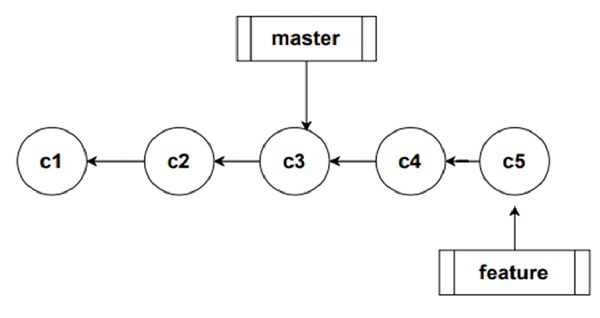
After Merging
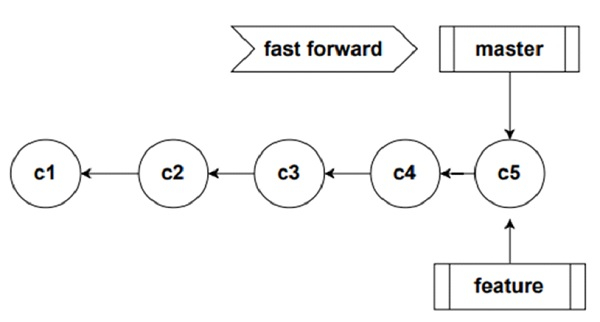
Fast-Forward Merge simply moves one branch(pointer) to the target branch.
3-way merge
Uses 3 commits, one is the source commit, one is target commit and the last one is the common ancestor commit.

Here, the source commit is My target commit is Other and the common ancestor commit is Base. The git acknowledges all the changes except the one that both source and target commits touched.
git squash
Merges multiple commits into one commit.